What is Menu Branch Assortment Setting?
The Assortment function in
Menu Management is used to control which
menu items are available at specific outlet locations. This ensures that
the right products are displayed and sold only where they are actually offered.
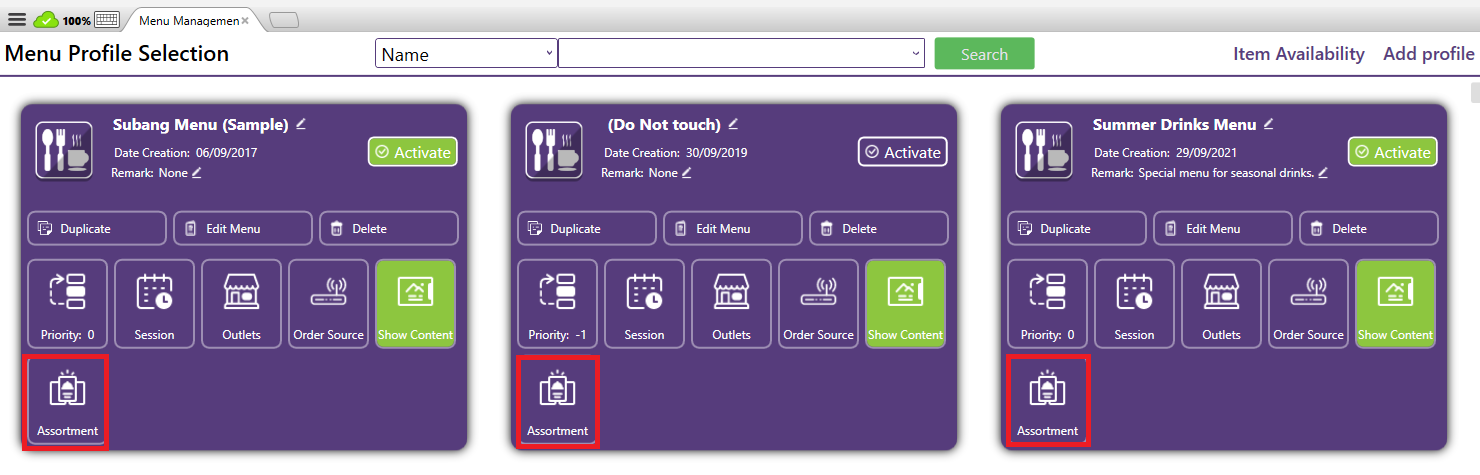
How It Works:
1. Assign Outlets with Branch Assortment enabled
- Each menu item (or group of items) can be linked to one or more outlets.
- Based on the outlet with assortment to limit the item allowed to be
added within the menu.
Outlets list to select for assortment
2. Customize Menus as per
Location
- Each outlet can have different assortments depending on their local inventory, kitchen capability, or regional preferences.
- After configuring the outlets in Assortment, the item allowed to be added to the menu will be filtered based on the outlets selected in assortment.
- Example: Outlet A in area A may sell "Seasonal Drinks", while Outlet B does not.
Related Articles
What is Menu Outlet Setting?
The Outlet Selection function allows you to control which outlets a specific menu will be applied to. This is especially useful for businesses with multiple outlets, where not all menus are shared across every location. When creating or editing a ...What is Menu Management in Xilnex Classic POS?
What is Menu Management in Xilnex Classic POS? The Menu Management function provides a centralized and flexible platform to design, organize, and maintain your product catalog across all sales channels. It is built to streamline menu setup, ensure ...How to Add a Menu Profile?
A Menu Profile refers to a specific set or version of a restaurant’s menu that is designed for a particular outlet, channel, or time period. It helps restaurants organize and control which food and drink items are available, where they appear, and ...What is Menu Session setting?
The Session function in Menu Management is designed to control when a menu is active and available for ordering. It ensures that menus are only shown or applied during their intended time periods, such as breakfast hours, lunch promotions, or special ...What is Menu Show Content Setting?
The Show Content function is a control button in Menu Management that determines whether an item’s image or content is displayed within the menu interface. When enabled, the system will display the item’s image (or other attached content such as ...
Recent Articles
Managing Lark User Email Mapping in Xilnex for Lark
Overview The Users card matches each Xilnex user to their Lark account by email. This is what lets features like Permission Approvals and Document Approvals deliver Lark cards to the right person. This article covers how to review the mapping and fix ...E-Wallet and Credit Card Payment - Recheck Status & Force Complete
This guide walks you through what to do when a payment goes through on the terminal or e-wallet, but Classic POS fails to commit sales. When Does This Happen? During payment, Classic POS will show a "Connecting to Ewallet party..." or processing ...E-Journal for BIR Compliance (Philippines)
Overview The E-Journal feature generates a .txt file that complies with BIR (Bureau of Internal Revenue) requirements in the Philippines. This feature is available only for the Philippines COM. Users from other countries' COMs will not be able to ...Disconnecting or Reconnecting Xilnex for Lark
This article covers how to disable a template, fully disconnect the integration from Lark, and reconnect it again. Disable a Template Turning a base off only stops that one base, everything else keeps syncing, and none of your existing data in Lark ...Creating a Base in Xilnex for Lark
Overview This article walks you through creating a base for a template, giving end users access to it in Lark, and verifying data is syncing correctly. Xilnex for Lark must already be connected before you start. If the Templates card isn't accessible ...
Popular Articles
Basic - How to create a voucher-coupon
Voucher and coupon definition Voucher can be generated in bulk and can be used once Coupon can only be created one at a time (reusable code) and can be use multiple times Pre-voucher / coupon setup There are 2 things need to be prepared before we can ...Understanding DuitNow QR Payment in ClassicPOS
Introduction This document introduces the DuitNow QR payment feature available in the Xilnex Retail POS, enabling merchants to accept payments conveniently through Malaysia's national QR payment standard. The integration of DuitNowQR simplifies the ...Intermediate - How to Configure and Use Approval Settings in Purchase Orders (PO)
1.0 What is approval setting In general, "approval setting" refers to the configuration or process by which a request, action, or change must be reviewed and approved before it proceeds. The term is often used in business, software applications, and ...Buy 2 for Special Price Promotion
Use Case: Stock clearance, seasonal offers, or spotlight products. From the sample screenshot above, this promotion requires 2 items to trigger. If only 1 Milk Tea is added to the sales list, no discount will apply since the condition of 2 items is ...Creating Delivery Type for Sales in Classic POS
How to Create Delivery Type 1. Access to the [System Configuration] 2. Select the [Sales] section 3. In the [All Outlets] tab, look for the 'Delivery Type' 4. Click on the [Configure] In the Delivery Type Setup form: 1. Enter the Delivery Type. 2. ...