Creating a New Username in Xilnex Portal

Creating a New Username in Xilnex Portal

How to Create a New Username in Xilnex Portal

Info
A new username can only be created by an existing user within the company.
(Rest assured, permission settings are in place to control who has the privilege to create accounts, preventing any unauthorized activity.)
1. Go to [System Configuration] from the menu bar.
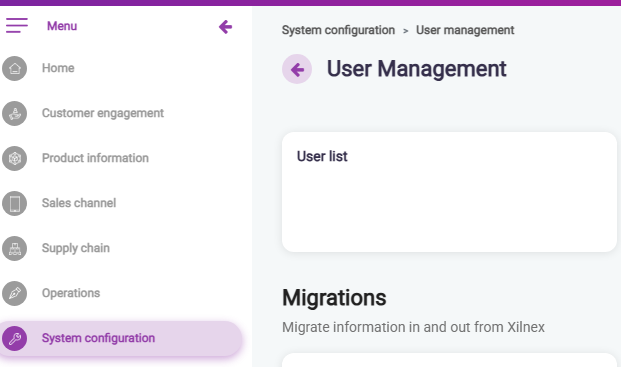

2. Select [User Management].

3. Choose [User List].
4. Click the green [NEW] button at the top right.

5. Select the login username type. This defines the credential that will be used to access the Xilnex ecosystem.
  1. Email
  2. Contact Number
  3. Username


6. Once the account is created, a system-generated password will be sent to the selected credential (email or phone number). 


User Role and Allowed Stores

When creating a username, the following two fields are mandatory before saving. Click on the articles below to learn how:
    • Related Articles

    • Creating An SMS Campaign

      Requirement Xilnex Username (with Xilnex Portal access granted) SMS account Where to get it? Kindly send your enquiry to billing@xilnex.com (charges may incur). How to create an SMS Campaign? SMS Marketing 1. Navigate to Xilnex Portal > Customer ...
    • Creating a New Store in Xilnex Portal

      How to Create a New Store in Xilnex Portal To create, edit, or delete a store, go to [System Configuration] in the menu bar and select [Store Management]. The system will display a list of stores accessible to your account. Create a New Store 1. ...
    • Updating Username Information in Xilnex Portal

      How to Update/Edit a Username in Xilnex Portal 1. Go to [System Configuration] from the menu bar. 2. Select [User Management]. 3. Choose [User List]. 4. Locate the username from the list using search or filters. 5. Double-click the username or click ...
    • Logging In and Setting Up MFA for Xilnex Portal

      1. Go to the Login Page Navigate to: https://portal.xilnex.com/Login. Use the credentials provided by our Xilnex representative. 2. Multi-Factor Authentication (MFA) After logging in, you will see a prompt for Multi-Factor Authentication (MFA). MFA ...
    • Importing Usernames in Xilnex Portal

      What is User Import? User Import allows you to add, update, or manage multiple users in bulk rather than handling them one by one. This feature is especially useful for onboarding new employees, migrating data, or making large-scale updates to user ...
    • Recent Articles

    • How to Stop Xilnex E-Invoicing

      Scenarios Requiring Xilnex E-Invoicing Deactivation Deactivate Xilnex E-Invoicing when a business falls below mandatory thresholds or ceases operations, ensuring compliance with IRBM guidelines while avoiding unnecessary module activity. This ...
    • Xilnex E-Invoicing Document Split

      Type Descriptions Product Xilnex E-Invoicing New Features E-Invoice Document Splitting Document Splitting Function Type Toggle Configuration E-Invoice Settings Required DB Upgrade No Release Date 13 August 2025 Background When a generated payload ...
    • Connecting KDS 2.0 to POS

      Xilnex ClassicPOS Important Notice: As of now, in order to use KDS2.0, Classic POS version must be at least version 2.16 July 2025 and above. 1. In System Configuration > select Device Configuration > under This Machine > look for Kitchen Display ...
    • Congiure a Client KDS - Connect to a Host KDS

      KDS Client A KDS Client Device in Xilnex KDS 2.0 is a display screen (such as a tablet, monitor, or smart TV) located at a specific kitchen station (e.g., Grill, Bar, or Cold Station). Its primary function is to receive and display orders sent from ...
    • Configure A Host KDS Device

      A Host KDS in Xilnex KDS 2.0 is the designated central hub device responsible for synchronizing and managing the entire kitchen network. It acts as the primary authority, ensuring that all orders from the POS system are correctly distributed to ...
    • Popular Articles

    • Basic - How to create a voucher-coupon

      Voucher and coupon definition Voucher can be generated in bulk and can be used once Coupon can only be created one at a time (reusable code) and can be use multiple times Pre-voucher / coupon setup There are 2 things need to be prepared before we can ...
    • Basic - How to change custom cost to another branch that don’t have custom cost

      Change custom cost to another branch that don’t have custom cost 1. Get the item list from the location with custom cost (Item Code, Name, Custom Cost) 2. Make sure the Show Location Price are selected 3. Export the item list in Excel 4. The file ...
    • Intermediate - How to Bill & Post to Sales from Transfer Note

      1.0 Purpose A bill is required from transfer note when an inventory transfer involves financial transactions, cost allocation, or compliance with tax and accounting regulations. It is used when stock is moved between outlets that operate as separate ...
    • Importing Usernames in Xilnex Portal

      What is User Import? User Import allows you to add, update, or manage multiple users in bulk rather than handling them one by one. This feature is especially useful for onboarding new employees, migrating data, or making large-scale updates to user ...
    • Configuring Web Report Access

      How to Configure Web Report Access? 1. Click on "System Configuration" on the left side panel. 2. Scroll down to find "User roles permission" under Users & Roles section. 3. Click on "All permission". 4. Click on "More", then select "Menu (Xilnex ...